
How to buy the perfect office chair without trying it on: A Complete Guide
Choosing the right chair without the opportunity to experience it firsthand is often a dilemma for many. Many businesses ask: How can I buy an office chair without trying it on, while still ensuring comfort and suitability for my needs?
In this article, Okamura will provide detailed guidance on how businesses can choose the right office chair for their specific needs, helping you confidently invest in a product that is both comfortable and durable, and optimizes long-term work efficiency.
Summary of the main points: To buy an office chair without trying it on beforehand, you can apply the following tips:
|
1. The best office chair selection process without trying it on
Buying an office chair without experiencing it firsthand is entirely possible if you understand the important evaluation criteria. Instead of relying on physical feel, you can make an accurate choice based on technical specifications and product descriptions.
1.1. Step 1: Check the basic specifications of the chair in detail
Technical specifications are the "objective basis" that help businesses visualize the chair's size, suitability, and support capabilities. This information is usually published by the manufacturer on its official website, in its product catalog, or at showrooms/distributors.
Carefully reading the specifications not only helps you choose the right chair for your body type but also reduces the risk of buying an unsuitable product.
Here are some key parameters you need to pay special attention to:
Chair width: The width of the seat, which directly affects comfort during use. A chair with the right width will prevent the user from feeling cramped and provide flexibility when changing working postures.
Chair depth: The distance from the front edge to the back edge of the seat. If the depth is appropriate, the thighs will be well supported without putting pressure on the knees. You should also carefully consider the seat size and leg width to ensure overall balance.
Chair weight: The total weight of the product, which affects mobility and stability. A chair with the right weight will ensure both stability during use and convenient placement in the space.
Chair load capacity: The maximum weight the chair can safely withstand under normal use conditions. This is a crucial factor in ensuring product durability and longevity, while also providing users with peace of mind during long-term use.
Chair height: The distance from the floor to the seat of the chair, usually adjustable. This parameter determines the correct sitting posture, ensuring your legs are positioned at a right angle and are comfortable. Additionally, check the height of the backrest and armrests to ensure proper support for your spine and shoulders. Most modern office chairs feature adjustable height options to perfectly fit the user's body shape.

1.2. Step 2: Prioritize chairs with multiple ergonomic adjustments
If you can't sit in a chair to try it out, the chair's adjustable features let you easily customize it to suit your body and needs. A chair with multiple adjustable functions will easily adapt to different body shapes, sitting habits, and work requirements.
This is especially important for maintaining proper posture, reducing pressure on the spine, and preventing health problems during long work periods.
Here are some important adjustable features you should prioritize:
Height adjustment: A basic feature that adjusts the seat height relative to the floor. Proper height adjustment ensures the feet rest flat on the floor, with knees at approximately a 90-degree angle, thereby reducing pressure on the thighs and spine. This allows users to maintain a proper and more comfortable sitting posture for extended periods.
Deep adjustment: This feature allows you to adjust the seat forward or backward relative to the backrest. When properly adjusted, the thighs are well supported without putting pressure on the back of the knees. This improves blood circulation and reduces numbness and fatigue from prolonged sitting.
2D-4D Armrest Adjustment: The armrests can be adjusted in multiple directions, including up/down (2D), forward/backward, swivel, and side/vertical (3D–4D). This ensures proper support for the arms and shoulders, reducing pressure on the neck. This is crucial for minimizing pain and fatigue from continuous computer use.
Recline Adjustment: Allows users to adjust the backrest angle for flexibility between working and relaxing positions. Proper reclining reduces pressure on the spine, especially the lumbar region. This allows for short breaks without affecting work performance.
Recline Tension Adjustment: This mechanism controls the tension when reclining, usually based on the user's body weight. The user can use varying amounts of force to recline the chair. Even a light person can recline with minimal effort, avoiding situations where they use excessive force.

1.3. Step 3: Choose the material according to your needs and usage environment.
When you can't sit in the chair beforehand, the material becomes a crucial factor in visualizing the product's feel and durability. Each material offers different levels of comfort, breathability, and aesthetics. Choosing the right material not only suits the work environment but also ensures a long-term user experience.
Below are some common materials and how to choose the right one:
Leather office chairs: Their standout advantages include a luxurious appearance and long-term durability. The leather surface provides a soft feel, suitable for high-end workspaces. This type of chair is usually suitable for leaders, managers, or private offices, especially in air-conditioned environments and where aesthetics are a priority.
Mesh office chairs: The biggest advantage is their light weight and superior breathability, which helps reduce heat buildup during long periods of sitting. The mesh material is lightweight, highly elastic, and ergonomically designed. This is an ideal choice for office workers who work continuously, especially in open environments or hot and humid climates.
Fabric office chairs: Offer a soft feel, a variety of colors, and are user-friendly. Fabric balances comfort and cost, making it suitable for a wide range of users.

1.4. Step 4: Consider accompanying accessories
Accessories play a supplementary role, enhancing comfort and providing better body support during use. Even small details can make a significant difference, especially when sitting for long periods.
Here are some accessories to consider:
Headrest: Provides support for the neck and head, reducing pressure on the shoulders and neck when sitting for long periods or when leaning back to relax. Suitable for those who frequently work long hours or are prone to neck strain.
Hanger: A small but convenient detail, allowing you to neatly hang items behind your chair. Suitable for modern office environments that prioritize tidiness and convenience.
Lumbar support: This is an important accessory that helps maintain the natural curve of the spine, reducing pressure on the lower back. Particularly suitable for those who frequently sit for long periods or need a proper sitting posture for more efficient work.

1.5. Step 5: Reference from user feedback
When you cannot directly experience the product, feedback from actual users is a useful source of information for objectively assessing the chair's quality. These reviews often clearly reflect the advantages and disadvantages during actual use, something that product descriptions cannot fully convey.
Furthermore, you can gain a better understanding of the chair's durability, comfort, and practical functionality across various work environments. This is crucial for making informed purchasing decisions and minimizing risks.
1.6. Step 6: Warranty terms and return policy
When buying a chair without being able to test it beforehand, the warranty and return policy help you minimize the risk of incurring costs due to early product defects/breakdowns.
In particular, a long warranty period of up to 10 years and a transparent support process reflect the supplier's credibility. This gives you greater peace of mind when making a purchase decision.
1.7. Step 7: Choose a reputable supplier
A reputable supplier will be transparent about the product's origin, provide complete technical specifications, and have a clear warranty policy. At the same time, they also have a team of expert consultants to help you choose the right product for your actual needs (for example, buying office chairs for a shared workspace/private office/meeting room/training room).
You should prioritize buying chairs from official showrooms or authorized dealers of the brand. These units provide products that meet quality standards and carry official warranties. In addition, showrooms offer online consultants to help you better understand the product's features, materials, and usage, thereby making the right choice and optimizing long-term return on investment.

2. Okamura - A premium Japanese office chair brand, suitable for all body types.
Established in 1945 in Yokohama, Okamura is a leading Japanese office furniture brand with over 80 years of history in creating workspaces. The company is globally renowned for its combination of sophisticated design thinking and meticulous manufacturing techniques, offering a leading solution to optimize the health of office workers.
Okamura office chairs are a symbol of Japan's combination of in-depth ergonomic knowledge and continuous innovation. Each chair is meticulously crafted to perfectly adapt to the body's movements, providing not only absolute comfort but also long-term health protection.
Here are some key features that set this brand apart in the market:
Smart Operation System: The entire chair experience is controlled with a single touch on the armrest, including opening/locking the backrest and adjusting the recline to 5 selectable levels via a control button on the left armrest, providing maximum convenience.
World-leading ergonomics: Okamura's renowned chair lines (Contessa II, Sylphy, Choral, Finora, ...) are meticulously designed to support the spine and joints, helping you maintain proper posture throughout the day.
Award design: Okamura's ergonomic chair models harmoniously combine user comfort and aesthetic value, considered works of art in the office space. They have won numerous prestigious design awards, such as the German Design Award and the Red Dot Award.
Exclusive technology: Okamura integrates intelligent adjustment mechanisms and multi-density seat cushions into its office chairs. In particular, the exclusive ankle-tilt technology allows the chair to flex, maintaining positive energy throughout the workday.
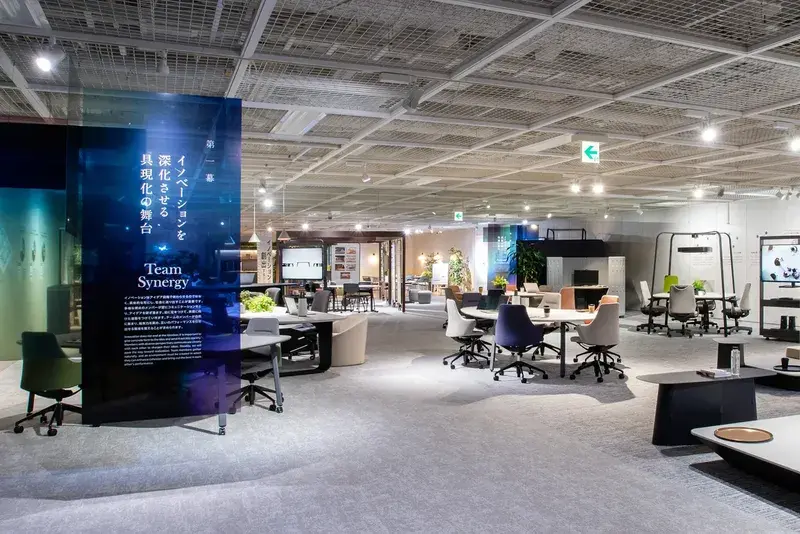
Suggested Okamura office chair products:
Employee work chairs: Sphere, Sylphy, Abilis,...
Executive work chairs: Legender, Contessa II, Choral,...
Meeting room office chairs: Shibusa, Plimode, Cynara,...
Training room office chairs: Runa, AN, AS,...
Buying an office chair without trying it out beforehand is no longer difficult if you understand criteria such as technical specifications, ergonomic features, materials, and warranty policies. These factors help businesses assess the quality of the chair without direct experience.
In addition, choosing products from a reputable brand like Okamura ensures durability, comfort, and long-term performance. Contact Okamura here.